 Wael.T
 Explore the development of image file formats, the pioneers behind them, the meaning of each, recent innovations, and predictions for the future of visual…
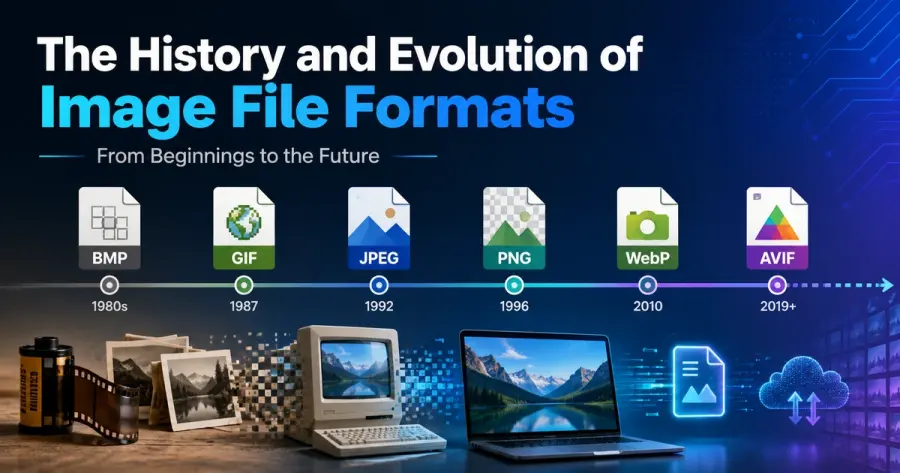
The story of image file formats is a fascinating journey through the evolution of technology, creativity, and the demand for efficient storage of visual content. From the earliest bitmap files to the latest high-efficiency formats, each development has played a pivotal role in shaping how we create, store, share, and view visual information. In this in-depth exploration, we will trace the origins of the most significant image file formats, describe their technical meaning and key contributors, analyze the emergence of new formats over recent years, and discuss the anticipated future for image file technologies.
The Origins of Image File Formats
As digital imaging began to gain traction in the late 20th century, early computer systems needed ways to represent images as sequences of bits and bytes. This necessity led to the creation of image file formats—standardized methods of encoding, compressing, and storing visual data in a way that could be shared and interpreted across different systems and software.
Bitmap (BMP): The Foundational Format
The Bitmap (BMP) format is widely considered the starting point for image file formats. Developed by Microsoft in 1986 as part of the first version of its Windows operating system, BMP encoded images as arrays of pixels with a fixed set of colors and optional compression.
Graphics Interchange Format (GIF)
As the need arose for efficient online images, CompuServe introduced GIF in 1987, revolutionizing web graphics. GIF supports up to 256 colors and, more importantly, animation and transparency—two features that propelled it into ubiquitous use online.
Joint Photographic Experts Group (JPEG/JPG)
As digital photography grew, the need for smaller files with minimal quality loss became apparent. The JPEG format, finalized in 1992 by the Joint Photographic Experts Group (an ISO/IEC group), enabled lossy compression that drastically reduced file sizes.
Tagged Image File Format (TIFF)
For industries needing highest-fidelity images, Aldus Corporation (later acquired by Adobe) developed TIFF in collaboration with Microsoft in 1986. TIFF allows both lossless and lossy image storage, supporting a vast range of color depths and metadata.
Portable Network Graphics (PNG)
In 1995, the threat of licensing issues for GIF (due to LZW patent claims owned by Unisys) prompted an open standard replacement: PNG. Designed by an open working group led by Thomas Boutell, PNG admitted more color depth, lossless compression, and true alpha transparency.
Scalable Vector Graphics (SVG)
Recognizing the need for images that could scale without losing quality, the World Wide Web Consortium (W3C) introduced SVG in 2001. SVG stores graphics as mathematical descriptions (vectors) rather than pixel grids.
Major Image File Formats Explained
Each file format has trade-offs in compression, quality, transparency, animation, and adoption. Here we’ll summarize the most important, both classic and modern:
Recent Innovations: New Image File Formats
In the last decade, exponential growth in digital imaging, bandwidth concerns, and high-resolution media have triggered a wave of new image file formats optimized for the modern era.
WebP
Google released WebP in 2010 as a modern replacement for JPEG, GIF, and PNG. WebP provides superior lossless and lossy compression, supports animations, and transparency—but in much smaller files.
High Efficiency Image File Format (HEIF/HEIC)
Standardized by MPEG (Moving Picture Experts Group) in 2015, HEIF/HEIC leverages the same compression technology as High Efficiency Video Coding (H.265/HEVC). It delivers comparable quality to JPEG at about half the file size and supports advanced features like image bursts and depth maps. Apple adopted HEIC for iOS photos starting with iOS 11.
AVIF (AV1 Image File Format)
AVIF, finalized in 2019, utilizes AV1 video codec compression for still images. Spearheaded by the Alliance for Open Media (companies including Google, Netflix, Amazon, and Mozilla), AVIF achieves industry-leading compression and quality, surpassing WebP and HEIC in many cases.
JPEG XL
JPEG XL emerged around 2020 from the JPEG committee, aiming to provide a unified, backwards-compatible replacement for existing formats (like JPEG, PNG, GIF). It boasts high compression efficiency and advanced features, but has seen slow adoption due to shifting industry priorities and complexity in implementation.
The Future of Image File Formats
The evolution of image formats is still in full swing, as demands for higher resolutions, advanced metadata, immersive experiences, and AI-driven processing grow. Based on current trends and recent technological advances, several paths are likely to define the future landscape of image file formats:
For ongoing news and updates on technology, you can explore authoritative sources such as W3C Graphics Activity or the Alliance for Open Media.
Comparing Popular Image File Formats
To help you decide which format is best for your needs, the following chart outlines the pros and cons of major image formats:
Conclusion
The history of image file formats is a vivid illustration of technological advancement shaped by shifting priorities—from the bulky BMP of the 1980s to the cutting-edge, web-ready AVIF. While no single format can solve all problems, ongoing collaboration between technology giants and open standards bodies ensures continued innovation. If you’re interested in digital tools conversion and related topics, you might also find our handy Day of the Week Calculator useful.
Staying informed about new formats and understanding when and why each format is the right choice will be crucial as digital imaging continues to innovate at breakneck speed. For privacy information related to image hosting and storage, please view our Privacy Policy.
Explore related image tools: Image Optimizer, PNG to JPG Converter, JPG to WebP Converter, and WebP to PNG Converter.